


WATCH: TIMELAPSE | HOW I BUILD AN ENCHANTED FAIRY POND

To start making the pond, navigate to the terrain tools in Build Mode and select the Terrain Manipulation tool (shovel icon). There will be several terrain adjustment tool options in this category; select the Flatten to Height option. Using the brackets and control key lowers the height, now lower the height by four. This will make the base of the pond.

Next, switch to the Water Tool in the terrain tool section, and select the Raise Water tool. Inside the hole in the ground, click four times with this tool to add water to the pond. Now switch back to the Terrain Manipulation tools and use the Smooth Terrain tool on the lowest settings to smooth out the edges around the pond. If there are still sharp corners, that is fine.

Then add Terrain Paint inside the pond and around the edges. This pond uses a combination of the Muddy Mud and Pine Duff paint to start. The pond is almost complete at this point and now needs a few decorations to make it look realistic.
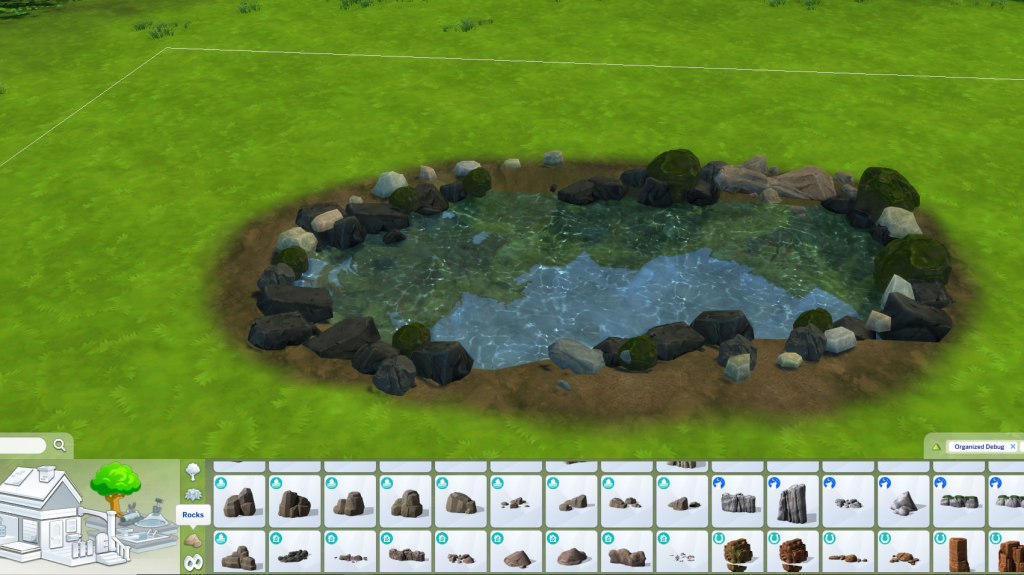
Grab various types of rocks from the Outdoor Plants section of the menu. More rocks can also be found in the debug section. A good thing to remember is that some rocks will be slippery, others mossy, and even dry. So experiment with the different rock textures to create a distinct look for the pond.
Optional: Use CTRL + 0 and 9 to shrink objects to create different rock sizes.

If some rocks are floating in the air around the pond edges, use the Smooth Terrain tool under them to make the terrain in those spots flatter. Another option is to use T.O.O.L mod to adjust each rock’s elevation. Add some shrubs and flowers around the pond, using the Smooth and Flatten terrain tools to adjust any floating plants.

Add a few final touches, such as Water Styles and Pond Objects, all of which can be found in the Outdoor Water Decor section. Touch up with any terrain paint adjustments that may be needed, and the pond is complete.





 ChromaGlitch
Leave a comment